1.25 inch button template (32mm)
A free printable 1.25 pin template with cut, face and safe-area lines, for US Letter or A4.
Or skip the template: upload photos and Punchframe fills the sheet →
Free for personal and commercial use. No email or account.
Updated
This 1.25 inch button template has a 1.629 inch (41.4 mm) cut circle, a 1.25 inch (31.8 mm) face circle and a 1.156 inch (29.4 mm) safe area, with 20 buttons per US Letter sheet and 20 per A4 sheet. Print it at 100% scale. It also works as a 32mm button template.
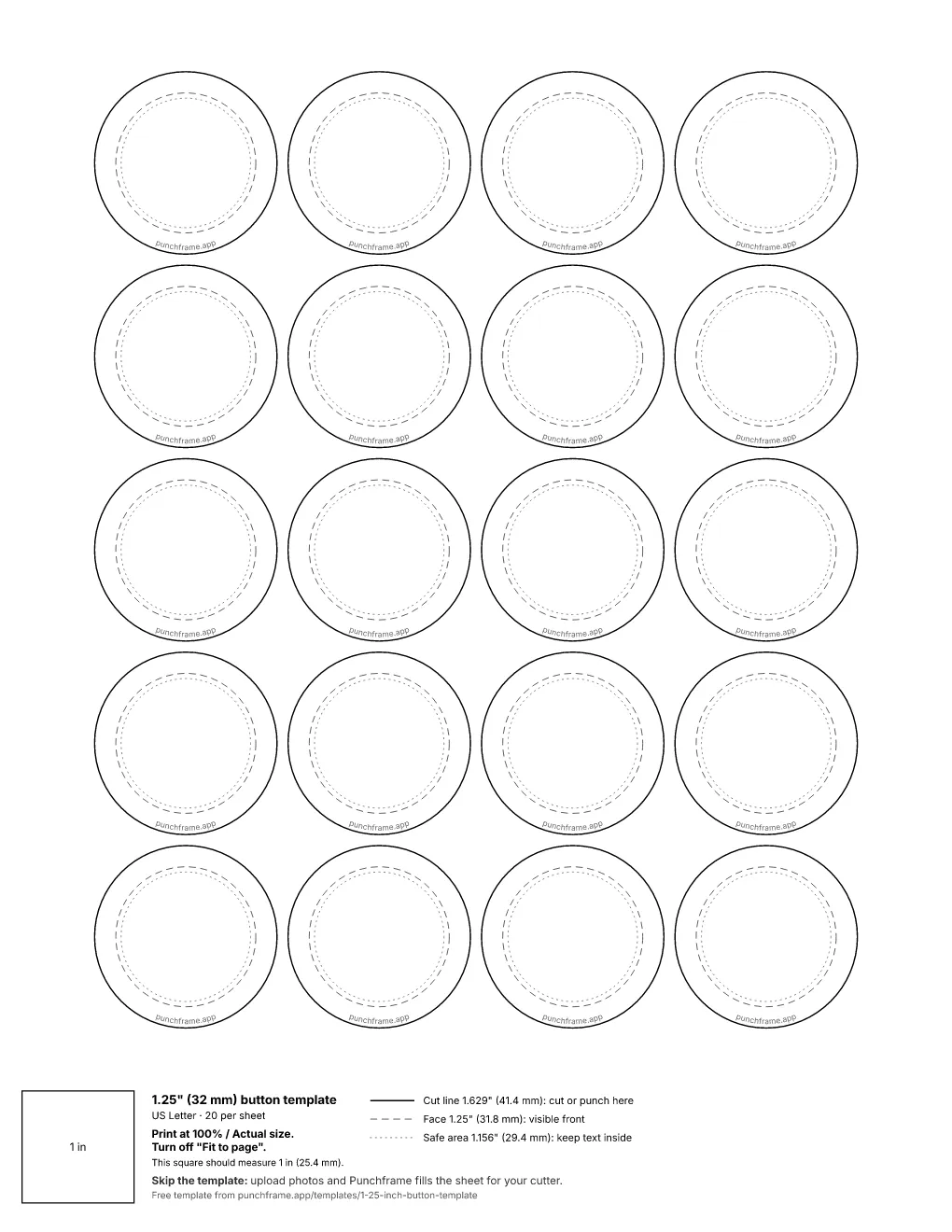
What each line on the template means
- Cut line (1.629 in / 41.4 mm)
- Cut the paper here. Everything between the cut line and the face line wraps around the edge of the button, so extend your background color or photo all the way to the cut line.
- Face line (1.25 in / 31.8 mm)
- The visible front of the finished button.
- Safe area (1.156 in / 29.4 mm)
- Keep text, logos and faces inside this circle so the curve of the shell does not bend or hide them.
| Button size | 1.25 inch / 32mm |
|---|---|
| Cut circle | 1.629 in / 41.4 mm |
| Face | 1.25 in / 31.8 mm |
| Safe area | 1.156 in / 29.4 mm |
| Per US Letter sheet | 20 |
| Per A4 sheet | 20 |
The cut line follows the 1.629 inch graphic size that American Button Machines and Tecre publish for 1.25 inch buttons. The safe area uses the 1.156 inch picture size from Tecre's 1.25 inch button layout.
How to use the 1.25 inch button template
- Download the US Letter or A4 PDF.
- Place your design or photo in each circle so it reaches the cut line, with text inside the safe area. The PDF can go under your designs in Canva, Photoshop or Illustrator. Keep the cut lines visible so they print.
- Print at Actual size or 100%, with Fit to page turned off.
- Check the 1 inch calibration square or measure one cut circle. It should be 1.629 inches (41.4 mm).
- Cut on the cut line with a 1.629 inch circle cutter, then press the button.
1.25 pin template sizes and machines
1.25 inch is the usual size for small pins, backpack flair and bulk giveaways.If your machine's paper circle is a different size, use the cut size printed in its manual.
Using it as a 32mm button template
32mm button presses take the same size shells as 1.25 inch presses. 32mm presses use the same size shells and a paper circle of about 41.4 mm, so this file works as a 32mm button template too. Small buttons leave little room, so keep text short and inside the 1.156 inch safe area.
Skip the template
Upload photos and Punchframe fills the sheet for your cutter. Each photo is framed inside the face circle, and the sheet prints at the exact size for your circle or square cutter.
Frequently asked questions
What size do I cut the paper for a 1.25 inch button?
Cut a 1.629 inch (41.4 mm) circle. The extra paper beyond the 1.25 inch face wraps around the edge of the shell.
Is a 32mm button the same as a 1.25 inch button?
The finished buttons are the same size: 1.25 inches is 31.75 mm, and 32mm is the metric name for it. 32mm presses use the same 41.4 mm paper circle as this sheet.
How do I print a button template at the correct size?
Choose Actual size or 100% in the print dialog and turn off Fit to page. Then measure one cut circle. It should be 1.629 inches (41.4 mm).
How many 1.25 inch buttons fit on one sheet?
20 on a US Letter sheet and 20 on an A4 sheet.
Can I use this 1.25 inch pin template in Canva?
Yes. Upload the PDF to Canva as the bottom layer, place a design over each circle so it reaches the cut line, and keep text inside the dotted safe area. Print the template with your designs on it so the cut lines show where to cut.
Can I use the template for buttons I sell?
Yes. The template is free for personal and commercial use, and no email or account is required.